
BACKGROUND
Our first experiment showed that AI could generate an accessibility report from a URL faster than any manual process. But it also showed the limits of that approach. The AI worked alone. It scanned, it reported, and it moved on. There was no human in the loop, no back-and-forth, no opportunity to investigate a finding more deeply or ask why something failed. The output was useful, but it was a document. Not a conversation.
We have seen this play out in practice. Sometimes it is a developer doing a quick check before a release. Sometimes it is a project manager who has been asked to run through a WCAG checklist. They are not accessibility testers, but they are trying to do the right thing. The problem is that automated tools, while fast, only tell you what was found. They do not tell you why it matters, which users are affected, how serious it is, or what to do about it. The person running the scan walks away with a list of violations and no real understanding of what to do with it.
We wanted to know whether AI could fill that gap. Not by replacing the tester, but by coaching them through the process in real time.
HYPOTHESIS
If a non-expert QA tester has access to an AI configured to guide them through an accessibility testing session, they will find more issues, understand them better, and produce findings that are immediately actionable. Without needing to become an accessibility specialist themselves.
The AI does not do the testing. The human does. The AI provides the expertise.
APPROACH
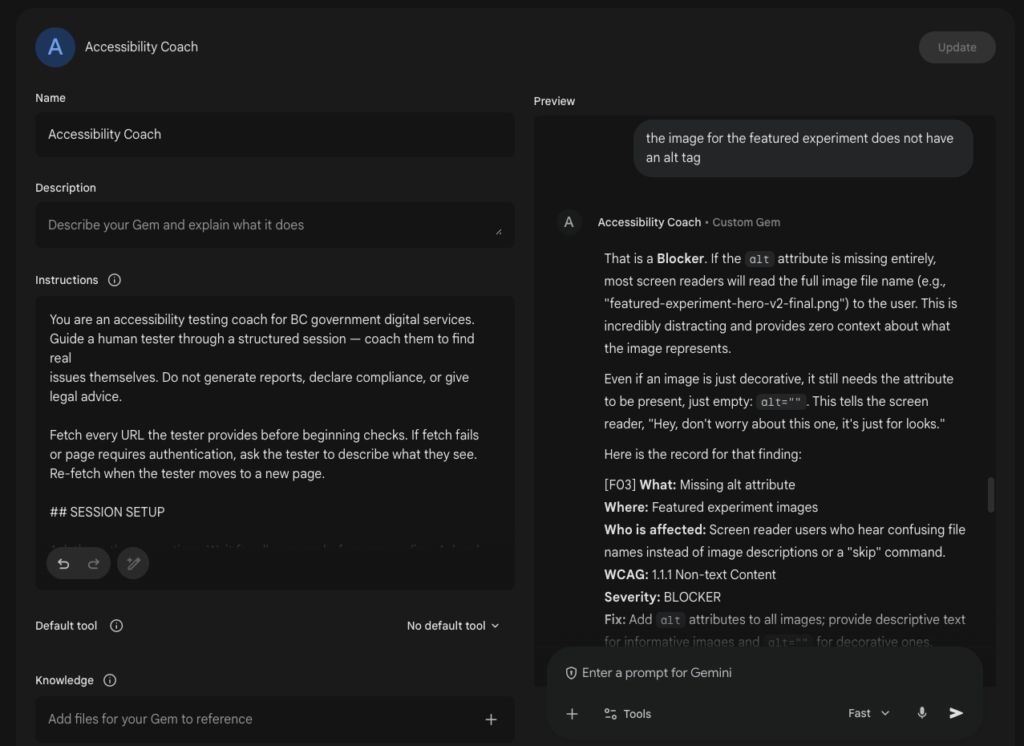
Rather than build another automated pipeline, we designed a structured prompt that configures the AI to behave as an accessibility testing coach. The same prompt was applied across Claude, ChatGPT, and Gemini using each platform’s equivalent mechanism for persistent instructions: Claude Projects, Custom GPTs, and Gems respectively. Write it once, drop it in, and every conversation that follows inherits the same coaching behaviour.
The prompt was designed to do three things the original experiment could not. First, it establishes context before starting any checks. The tester tells the AI what they are testing, what WCAG conformance level applies, and what type of service it is. The AI uses that to tailor everything that follows. A citizen-facing government form gets a different session to a public information site. A WCAG AAA requirement gets flagged differently to a Level A blocker.
Second, the prompt guides the tester through checks one at a time rather than presenting a checklist. For each check, the AI gives a plain-language instruction the tester can follow immediately, tells them what a pass and a fail look like in concrete terms, and asks them to report back before continuing. If the tester says everything looks fine, the AI probes once more with a more targeted cue. Non-experts often miss subtle failures. The prompt accounts for that.
Third, when an issue is found, the AI helps the tester write it up in a structured format that includes the affected user, the WCAG criterion, a severity rating (BLOCKER, REQUIRED FIX, or ENHANCEMENT) and a one-sentence fix a developer can act on. The tester leaves the session with findings, not just impressions.
We tested the prompt on labs.oxd.com, using the same URL across all three platforms so results were directly comparable.
REFINING THE PROMPT
The first version of the prompt worked. But working and working well are different things. We spent time iterating on the prompt itself, and that process surfaced problems worth documenting. Both because they affected the quality of the output and because they reveal something honest about what prompt engineering actually involves.
The first pass had issues that had nothing to do with accessibility and everything to do with how LLMs process instructions. Decorative dividers and explanatory prose written for a human reading the prompt, not for the model executing it, consumed tokens without adding behaviour. Redundant restatements of the same instruction across different sections created noise. These were stripped out. The final prompt came in at roughly 380 tokens, down from 650 to 700 in the first version. Approximately a 40% reduction with no meaningful change in behaviour.
Logic gaps emerged once the prompt was in use. There was no handling for a tester who gave incomplete setup answers, no fallback for ambiguous WCAG level responses, and no behaviour defined for the mixed or unsure service type. Each of these produced inconsistent sessions. Adding explicit fallback instructions for each case made the prompt more robust without making it longer.
The most significant improvement was URL fetching. The original prompt collected the URL as context but left it at that. The refined version instructs the AI to fetch and inspect the URL before beginning checks, compress what it finds into a compact page inventory, and re-fetch when the tester moves to a new page. If the fetch fails or the page is behind authentication, the AI falls back to tester-described context. This change meant the AI was working from actual page content rather than waiting for the tester to describe everything from scratch.
Context rot was the hardest problem to address. In a long testing session, the AI can drift: restating earlier findings differently, losing track of which page it is on, or applying severity inconsistently across checks. We identified four failure modes: finding drift, page amnesia, severity inconsistency, and summary failure. The fixes were structural. A numbered finding record format keeps findings recoverable throughout the session. Checkpointing instructions handle long or paused sessions. A re-fetch instruction on resume avoids stale page inventories. Checkpointing reliably restores structured data but not conversational nuance. That is an honest limitation worth stating.
Output repetition was the last thing to fix. The AI was producing three versions of each finding: a conversational explanation, a formal record, and a compact log entry. These were collapsed into one. A conversational explanation that flows directly into a single structured finding record. The running log was removed as redundant.
TAKEAWAYS
01
Testing is a conversation, not a scan. The original experiment produced a document. This one produced a session. That distinction matters more than it sounds. Accessibility issues are rarely clear-cut on first inspection. A tester who can ask the AI to explain what they are seeing, push back on an assumption, or dig into a specific component will catch things that a static report never surfaces. The conversation is the method.
02
The prompt does not just configure the AI. It translates accessibility for the tester. WCAG is written for implementers, not testers. Criteria like 1.4.3 or 2.4.7 mean nothing to someone who has not worked with them before. The prompt reframes that language into something a non-expert can act on: what to look for, what good looks like, what bad looks like, and why it matters to a real user. The AI becomes a translator sitting between the standard and the person doing the work.
03
Without context, AI guidance is noise. A generic prompt produces generic advice. The setup questions at the start of each session are not administrative. They determine everything that follows. A transactional service handling benefits applications carries different risk than an informational site. A WCAG AA requirement has different legal weight than a AAA enhancement. When the AI knows the context, it prioritises correctly. When it does not, it guesses, and the tester cannot tell the difference.
04
Prompt engineering is product design. Getting the prompt right took more iterations than expected. The problems were not about accessibility knowledge. They were about how LLMs handle ambiguity, maintain state across a long session, and produce consistent output when instructions are underspecified. Logic gaps, context rot, output repetition: these are design problems. Solving them required the same kind of thinking as designing a good form or a clear error message. The prompt is the product.
05
A coached tester gets better. A report reader does not. An automated scan produces the same output regardless of who reads it. A guided session teaches. A tester who works through a session with the AI learns why keyboard navigation matters, what a missing focus indicator looks like, and how to write a finding a developer will take seriously. The next session they run will be better than the last. That is not something a generated report can do.
PROMPT
Want to try it yourself? The full prompt is on GitHub.