
BACKGROUND
AI agents writing UI code don’t have access to your design system. They generate something plausible based on training data, which means wrong border radius, invented colour values, components that look nothing like your mockups. You can paste in a style guide, but style guides are written for humans. There’s no standard way to tell an agent “this colour means error state” or “we never use drop shadows.”
The existing tools don’t quite cover this. Design-to-code tools produce implementations, not rules. Figma MCP gives agents canvas access but doesn’t encode design intent. Style Dictionary requires your Figma Variables to already be set up properly, which most working files aren’t. Google’s Stitch DESIGN.md is token-focused rather than behavioural. None of them are aimed at a developer who has just received a mockup and wants to start writing code with an agent today.
HYPOTHESIS
A tokens.css file with exact values paired with a SKILL.md encoding component rules, anti-patterns, and behavioral constraints gives an agent enough to work from. The tokens.css is the vocabulary. The SKILL.md is how to use it. Generate both from a screenshot or Figma file, put them in .agents/skills/, and the agent picks them up automatically in Cursor, Copilot, Windsurf, or Claude Code.
APPROACH
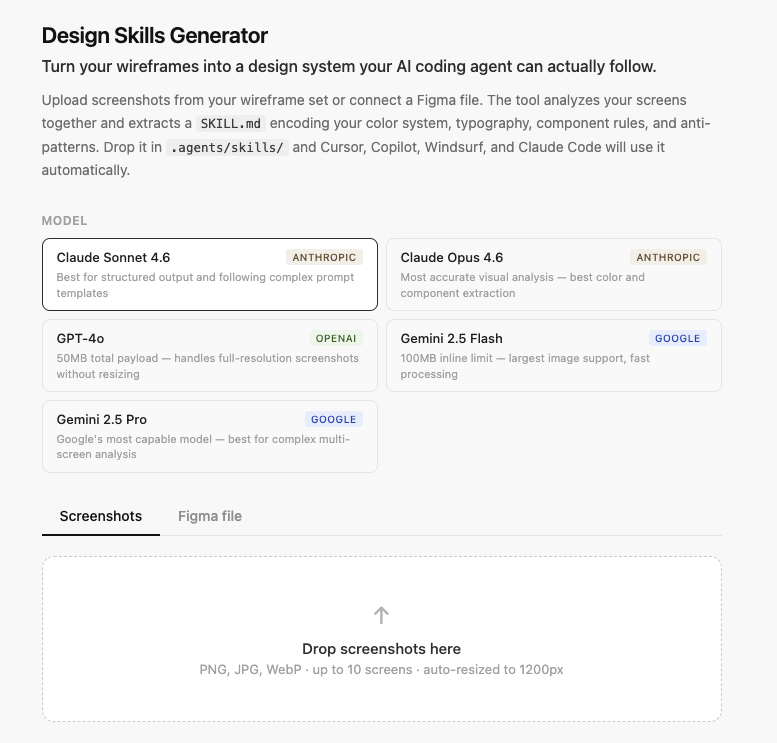
We built a web app with two input paths: screenshot upload and Figma file connection. The tool accepts PNG, JPG, and WebP, and analyzes up to 10 screens in a single pass. Multiple screens help because the model picks up on patterns that repeat across frames, which a single screen won’t show.
We hit the Anthropic API’s 5MB image size limit early. The first fix was JPEG compression, which kept file sizes down but corrupted flat colour areas. We switched to resizing to 1200px PNG client-side. The model is estimating colours from images rather than measuring them, so we at least didn’t want compression making that worse.
We tested extraction across Claude Sonnet 4.6, Claude Opus 4.6, GPT-4o, and Gemini 2.5. Claude models cap at 5MB; GPT-4o handles 50MB total; Gemini takes 100MB inline. GPT-4o and Gemini produced better colour accuracy because they could work from higher-resolution images. Opus produced the best overall output, stronger on both image analysis and SKILL.md structure, but it’s token-intensive and shares the same 5MB limit as Sonnet. Sonnet was the practical default for most inputs. The pattern that emerged: better image fidelity doesn’t help much if the model produces poorly structured rules on the other end.
Some extraction categories always appear in the output: typography, interaction states, responsive behaviour, page layout templates, navigation patterns, and feedback and status patterns. Others are selectable depending on what the project needs: color system, component patterns, spacing and layout, anti-patterns, iconography, forms, and data display. Component patterns means each component rendered as a CSS mini-spec with exact values. Anti-patterns means what the design explicitly avoids. Spacing means concrete pixel values and grid definitions, not general descriptions.
Semantic color groups turned out to be important. We were working with a system that used green, blue, grey, and gold across multiple card types, each color carrying a different meaning depending on context. Without naming those groups explicitly, the agent would assign its own meaning to each color. There’s nothing in a hex value that tells it otherwise.
The prompt format changed significantly during development. We started with prose descriptions and moved to a spec format: CSS mini-specs per component, exact pixel values, explicit forbidden choices. The single most useful change was instructing the model to output only the two files, starting immediately with a delimiter. Without that, it would reason through the design before producing output and we’d have to parse around it. We raised max_tokens from 2,000 to 6,000 to fit both files in full.
TAKEAWAYS
01
Token values alone don’t give an agent enough to work from. The behavioral layer matters more: which color means which status, what a component explicitly avoids, where the system has hard rules versus flexibility. A hex value doesn’t carry that information on its own.
02
The generated files need a human review pass before they’re useful. The model estimates rather than measures, particularly for colour. In practice this means the developer and designer go through the output together, correct the values, and fill in anything the extraction missed. That review step is where the files actually become accurate. The model produces the structure; the people fill it in correctly.
03
Specificity in the rules produces specificity in the output. “Use brand colours consistently” gives the agent nothing to act on. “Use –colour-action-primary for all primary CTA buttons; never use –colour-status-success outside of feedback states” does. The more precisely the SKILL.md defines constraints, the less the agent has to guess.
04
There’s a natural evolution to how this gets used. Before a component library exists, the generated SKILL.md does a lot of heavy lifting. As the project matures and real components get built, the file needs to be updated to reflect what actually got built rather than what was extracted from a mockup. Think of it less as a tool you use once at project start and more as a living document that stays useful as long as someone keeps it current.
CODE
Want to try it yourself? The full source code is on GitHub.