
BACKGROUND
Accessibility audits are tedious. Our QA team knows this firsthand. Traditional tools like Axe or WAVE are reliable but narrow: they catch what they can measure programmatically and miss the rest. Meanwhile, most teams lack the time or budget to do thorough manual reviews. They wanted to see whether AI chat tools could fill that gap, or at least make the gap smaller.
HYPOTHESIS
General-purpose AI tools like ChatGPT, Gemini, and Claude are capable of analyzing visual and structural information from websites. If prompted correctly, they might surface accessibility issues that rule-based scanners miss, and do it fast enough to be useful in a real workflow.
APPROACH
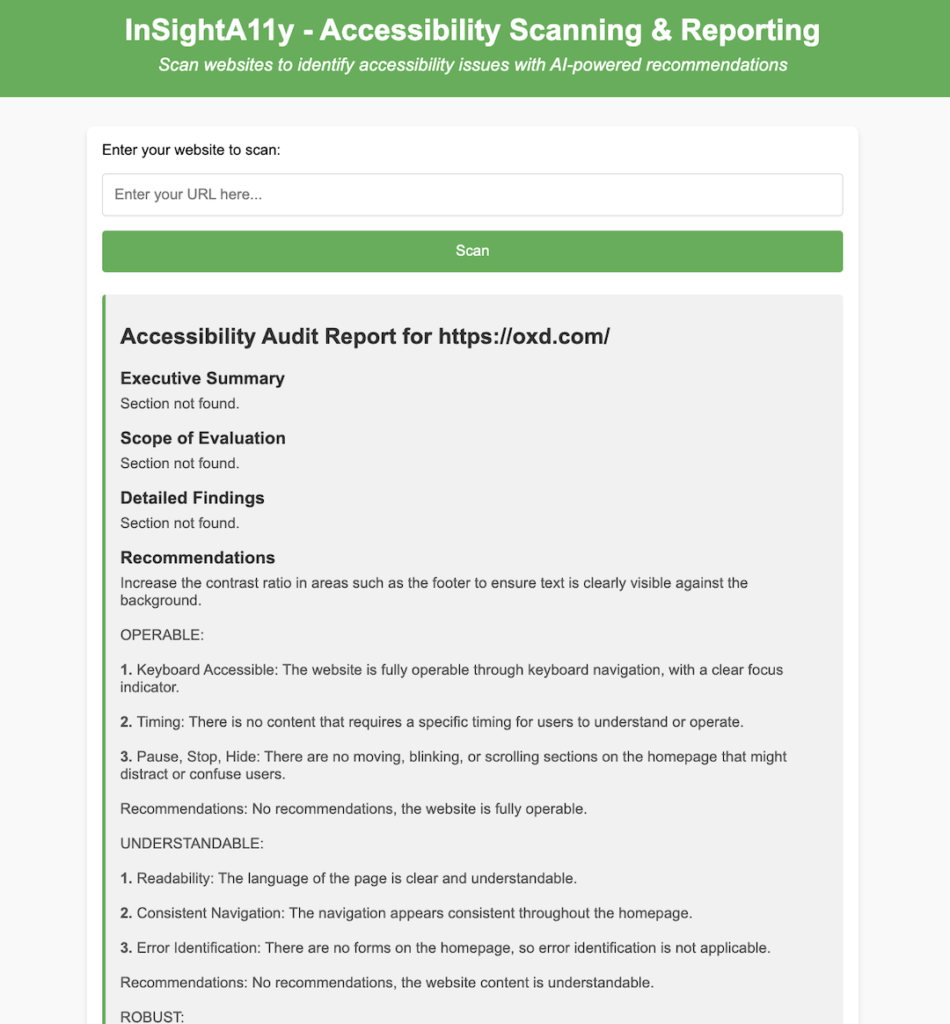
Our QA team built a lightweight web app where a user pastes a URL, and the backend passes that URL along with a structured prompt to OpenAI to generate an accessibility report. The report then displays violations and recommendations formatted for sharing with teams and stakeholders.
The build itself was straightforward. The prompt engineering was not.
We started with something simple: ask the AI to review the URL for accessibility issues. The output was generic enough to be useless. It listed broad categories like “ensure sufficient color contrast” and “add alt text to images” without any specificity to the actual page we submitted. It read like a copy of the WCAG guidelines, not an audit.
So we treated the prompt like a product requirement. Each iteration asked for something more specific: identify violations by WCAG criterion, call out the affected element, explain why it fails, and suggest a concrete fix. We also had to tell the model what format we wanted the output in, because left to its own devices it would structure the report differently every time. After several rounds, we landed on a prompt that produced reports specific enough to hand off to a developer and structured enough to share with a non-technical stakeholder.
We also ran the same URL through the prompt multiple times to stress-test consistency. The findings varied. Not always dramatically, but enough that we would not want a team acting on a single pass without reviewing it.
TAKEAWAYS
01
The prompt is the product. The difference between a useless report and a useful one had almost nothing to do with the model and almost everything to do with how we asked the question. A vague prompt gets you WCAG boilerplate. A specific prompt, one that tells the model which standard to reference, what format to use, and how granular to get, gets you something a developer can actually work from. Teams that want to use AI for auditing should budget real time for prompt development. It is not a one-and-done step.
02
You have to tell the AI what a good answer looks like. Early prompts returned whatever structure the model felt like using that day. Once we specified the output format explicitly, including sections for the violation, the affected element, the WCAG criterion, and the recommended fix, the reports became consistent enough to be shareable. This is a pattern that shows up everywhere in AI tooling: the model is capable of good output, but it needs to be shown the shape of it.
03
AI audits are inconsistent, and that inconsistency is the whole problem. Run the same URL twice and you will get different findings. For accessibility work, where the goal is a reliable repeatable checklist you can act on and defend to stakeholders, variability is not acceptable on its own. Every AI-generated report needs a human review pass before anyone acts on it.
04
AI finds things rule-based tools miss, and misses things they catch. Traditional scanners are good at binary checks: missing alt text, incorrect ARIA roles, contrast ratios. AI is better at judgment calls: whether a layout is confusing to navigate, whether instructions are written clearly, whether a UI pattern is likely to create friction for someone using a screen reader. Neither replaces the other. The most complete audit uses both.
05
The real value might be speed, not completeness. A human expert doing a thorough audit takes hours. An AI scan with a well-engineered prompt takes seconds and gets you most of the way there. For teams that currently do no accessibility review at all because it feels too expensive or slow, a report that covers 70% of the issues is meaningfully better than nothing. The goal is not perfection on the first pass. It is making the first pass cheap enough that teams actually do it.